
My Writing Process Series
- Part 1: Intro
- Part 2: Tools of the Trade
- Part 3: Taking Notes <— This Week
Howdy freeholders!
It’s time for another edition of my blog posts series on my writing process. I am going to discuss note-taking and how I keep track of all the things I write down, from story ideas, title ideas, background details, to research.
Over the last several years, I’ve condensed everything into one comprehensive system that I now use instead of the just-write-stuff-down-wherever-I-could process that I had used for the first half of my career. This is a more elegant, streamlined approach, and it fits with my season of life (being lazy) and my writing process in general.
To start, there are several key apps that I use frequently to collect, collate, and corral all my notes. Obsidian, which is a fantastic app for notes, Bear, another fantastic markdown app for notes — considerably prettier and easier to navigate than Obsidian, though — and DevonThink, the app with the funny name, that’s like a AI-powered file cabinet.
I’ve included links to all of these software, all these programs, and just so you know, I’m not affiliated with any of these companies in any way. I’m just telling you what I use, why, and how.
Capturing Ideas
Okay, the first step is capturing notes. To do this, we have to look at sources of our ideas, be they newspapers, TV, magazines, books, people, or events. There are paper sources and there are digital sources. Conversations can be sources, or even something heard over the radio.
Talking with the dead
For any paper sources — say, if I have the physical book in my hand — I will usually use a pen or a highlighter as I’m reading to call out specific parts of the book that are interesting to me. This took a little while to get use to, as I was, for most of my life until very recently of the opinion that books must be treated like treasure and only gently used. I never dog-eared my books to mark my spot and once I clawed my way out of High School, I never doodled in them either (though text books I don’t really count).
I used to believe books were sacrosanct and kept them in pristine condition as I was growing up and well into adulthood. But now, I’ve come to understand that a book is merely the collection of ideas of the author. And it’s the closest thing anyone can have to telepathy. The ideas on the written page came straight from the brain of the author, and now they’re going straight into my brain without any outside influence (of course there were likely editors involved).
Reading words written by people, be they Marcus Aurelius, Thomas Jefferson, or Socrates, is the closest thing humans will ever get to time travel, I believe. If I take notes in a book or underline things, or highlight passages, I’m marking things I particularly enjoy or take issue with or have a thought on.

Writing notes in the margin of a book is like having a conversation with the author…
And when I think about the fact that I can take notes in a book written by a Roman Emperor 2000 years ago, it’s as if I’m having a conversation traveling back in time one might say with a historical figure. What I’ve only recently discovered is that taking notes in a book and then revisiting them maybe a year or two later can make me realize that I have further thoughts on the subject as I review the paragraph or sentence and my notes in response.
There have been several times where I’ve either changed my thinking or expanded on that idea just by rereading notes I wrote in the margins of a book. Once my thoughts are written down on the page to mingle with the author’s, I go into my Obsidian app — I have a template set up for book notes — and go through chapter by chapter, recording my highlights and notes.
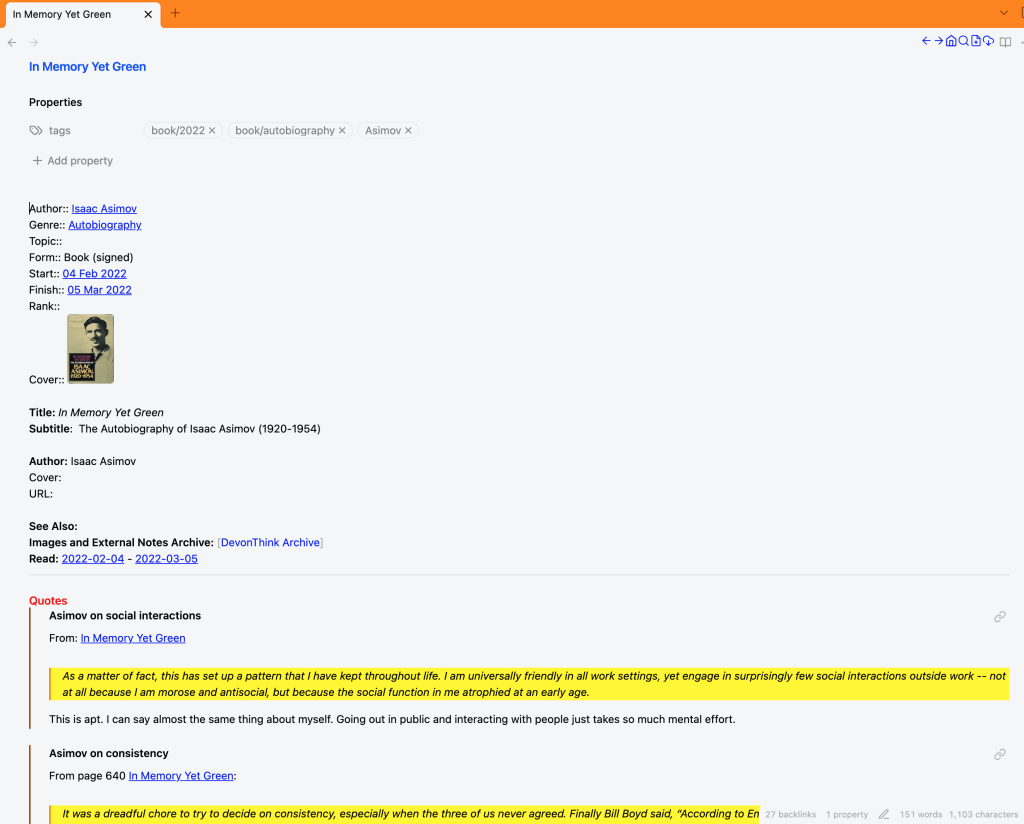
To the right is an example of what a book note looks like for me in Obsidian. I list metadata about the book, inlcuding when I read it, then launch into chapter notes, or in this case, with Isaac Asimov’s autobiography (part 1), In Memory Yet Green, I list some quotes I found interesting.
In this way I can distill a 300 page book down to a few pages of notes and things that I wanted to remember about the subject. Those are much easier to quickly reference than the entire book. I also carry around with me a small notebook and paper and pen everywhere. Anything that I think is interesting, amusing, or worthy of remembering I’ll jot down that notebook. I have a daily process that at the end of the day I take the little notebook and scan the image, throwing it into a file on my computer and taking relevant information out and plugging them into whatever notes I’ve already captured on my computer. It’s a way of keeping thoughts organized, and it’s an interesting way to wind down the day I found, by reviewing things that I found of note throughout the morning and afternoon and day.
Talking to myself
Then I have voice memos. I may use these more infrequently than any other method, but occasionally on long trips I will have ideas that simply won’t go away. Unable to pull the car over and take notes if I’m on the highway, I simply pull up the voice recorder app on my phone and start talking (if I don’t have my little Sony recorder with me).
Being able to take notes hands-free while navigating boring stretches of highway is a wonderful way of maintaining my ability to keep the progress going for the day when I have a few hours that I simply cannot sit and write. Once these notes are transcribed using Dragon (click here for the blog post on dictation), I plug those notes into my Obsidian files and link them into my master list in Bear.
Organizing the notes
Obsidian

Next up, I have my Obsidian notes I will eventually do an entire post on Obsidian, but for now, know that it is a program that collects text files—your notes—in multi-markdown format. [1] It seems complicated and convoluted and very basic—and quite ugly actually if you’re used to the Apple ecosystem and its simple elegance of design—but it freaking works.
There’s no other way around it.
Once I got used to the quirky method of typing in markdown , which suits my purposes admirably, keeps all of my notes and files locally on every device I have, keeps them in text format, the universal syntax that seems to be applicable to be readable by every program ever made. I don’t have to worry about my notes five years from now not being readable by whatever app I’m using at the moment because they’re text files, readable by everything. The individual notes are therefore small, easily maneuverable, and as I said, adaptable to any program.
Text notes are the perfect solution for people like me, who don’t want to fiddle with technology every time there is an update, who just want to sit down and write. Inside Obsidian, I’ve organized things by subject matter or date, to keep things easily accessible, but I’ll go into more detail on Obsidian in a later post.
Each subject note contains all the information collected on a particular subject/idea/thought, for instance, a coronal mass ejection. I have links to articles and notes from books and everything that I’ve gathered about coronal mass objections in this file—or link to this file. Obsidian is great for writing down text and creating links to things so you can keep track of it all, but it’s not great for storing things. For that, you need a file cabinet.
DevonThink

My file cabinet of choice is DevonThink. It’s a weird name, I’ll admit, but it is like the best file system I’ve ever seen. I put everything in the DevonThink for storage, organized by folders and topics. PDFs, pictures, copies of whole websites, entire books, digital versions of magazines—anything I can think of, all the way up to and including video files—goes into DevonThink.
It’s a massive database that kind of works like the hard drive on my computer, so at first I was thinking this is just a waste of time, I could organize my computer with folders, etc. But DevonThink has features that my Mac just can’t match, like AI powered searching and collating and organizing, allowing me to have a file in one folder, and a duplicate (just a placeholder really, it doesn’t create a second file) in another folder. This is handy if a single note touches on multiple topics. The list goes on as to why DevonThink is better than just organizing my hard drive (it’s an SSD but I’ll always call it a hard drive…I’m too old to change), but those are the features I use most and it’s worth every penny I paid for the license.
From inside DevonThink, I can create a link—usable on many of my apps, such as Obsidian. So, on my coronal mass ejection page in Obsidian, I have links to files stored in DevonThink with pictures from satellites and teleconference videos from NASA—all kinds of digital ephemera.
Bear

One place I believe Obsidian falls flat, however, is in displaying images, ease-of-use, and general prettiness. That’s why I also use Bear. This is another markdown editor and notetaking app, which does practically everything Obsidian will do, only faster and smoother, and there’s that word again, prettier. This is because Bear is an Apple Native app, where Obsidian is what’s called an Electron app…basically web app wrapped in something to make it work on Apple machines.
Granted, you can configure Obsidian with many thousands of community and make it look anyway you want, but I have found for my purposes that I end up spending too much time fiddling with it than actually using it.
Bear looks great and runs smooth from the moment you first open it. That’s all I need. There are few reasons that I don’t use Bear as my sole note-taking app, which I’ll get into that other post I’ve mentioned. But for now, suffice it to say that referencing my Map of Content—the one file to rule all the files connected to a particular topic, like an index—I use Bear. It’s faster to edit, works quicker, and accepts all the links from DevonThink and Obsidian so that I can keep track of everything I’ve collected in one spot.
In certain areas, such as notes concerning my personal life, I am transitioning notes out of Obsidian into Bear to keep them all in one spot. But I’ve invested so heavily in Obsidian for things like book notes (which I make heavy use of templates), that it’s easier to just link to those existing notes rather than duplicate them in Bear. Using three apps is a bit of a boondoggle, but it seems to work for me for now. If it ever becomes unwieldy, I’ll probably transition away from Obsidian into Bear and continue to use DevonThink as the file cabinet of choice.
So that’s how I collect and maintain all my notes. But how I use them?
Using the notes
At my desk, I have two monitors on my desktop. If you’ve have never used two monitors before, I can’t recommend it more. Once you go to two monitors you’ll never switch back.

My left monitor, which I have situated horizontally, is for Scrivener, with the book file open. My right monitor, which I have positioned vertically so that I can have an entire page of a document open in Word at once (more on this later, and how I use Scrivener and Word in tandem). If I don’t Word open on the vertical monitor, I’ll have my notes apps, Obsidian and Bear ready and waiting.
As I write, I’ll make sure to have the topics cover what I’m working on displayed on the right-hand side, so that I can crosscheck information, check spelling, and make sure I have references correct. It’s a little tedious, which is why I save it for the editing process instead of while I’m writing, which will be better seen in the post I’m going to write about my writing itself. You’ll see this pop up in the post on editing as well, stay tuned.
So there you have it, Freeholders! In a nutshell, that’s how I collect notes from dictation, handwriting, and highlighting in books and magazines. By the way, this is also done with digital items using an app called Omnivore. It allows me to make digital highlights on PDF files, websites, and books imported from my Kindle—all of these are automatically exported to Obsidian, organized by date and the title of the work I was noting. It is a very fast, seamless, and the easiest way I’ve found to get notes out of things that I read online, and the best part is it’s free!
Next time I’ll talk about how I plot next time I will delve into the plotting of the book, now that we’ve gotten the tools and the note-taking process out of the way. As always, keep your head down and patted dry my friends. We live in interesting times.
Notes
[1]: Google it, if you’d like…it’s a strange way of writing without having to stop and select text and indicate it’s bold or italics. To do so in markdown, you use a combination of characters before and after the word you want to modify and it changes to italics or bold or what have you, so you don’t have to stop your train of thought, move the mouse cursor to a little icon, click said icon, then move the cursor back to your word and keep typing. I’m not saying I’m fluent in markdown and use it all the time. I’ll always prefer a good old WYSIWYG editor like Word or Scrivener…by the way WYSIWYG means What You See Is What You Get, pronounced whizzy-wig. But on little documents like notes, I’ve found markdown is more efficient for me.

 The Freeholder Press
Leave a reply to My Writing Process: Editing…Part 2 – The Freeholder Press Cancel reply