
My Writing Process Series
- Part 1: Intro
- Part 2: Tools of the Trade
- Part 3: Taking Notes
- Part 4: Plotting
- Part 5: The First Draft
- Part 6: Editing…or the Second Draft
- Part 7: Editing…Part 2 ← You Are Here
Howdy Freeholders!
Welcome to the second part of my editing post, itself a part of my series of posts on my writing process. Last time, I went over how I started out editing and how that changed for me as I grew more confident and wrote more books, and where I ended up with my process. Today, I’ll lay out the details of editing.
The First Pass
Typically what I do is read through the document a few days after letting it sit. On this first pass, I am looking for glaring plot holes. If I come across spelling mistakes or missing punctuation (actually, this is quite rare, because Dragon almost never makes mistakes) I’ll knock then out, but that’s not what I’m trying to do in the first pass.
Usually what happens is as I tinker with files throughout the book, I will end up dictating some sections, making corrections or changes manually, and those sections are the ones that end up with the mistakes.
In the early days of my career, it was rough seeing those underlined words and missing quotation marks, etc. and forcing myself to keep going, but it worked in the long run. By looking at the big plot holes and characters in the wrong scenes and that sort of thing, I was able to get a better grip of what the actual story looked like from a bird’s eye view.
For example, I made sure that character a who died in the fifth chapter doesn’t suddenly reappear in the 20th chapter toward the conclusion of the book, or with a different hair color or such minute details that could throw someone off the story.
I go through the entire book this way, and usually there’s not that much that I catch. So, I indulge myself and make a few of those spelling and punctuation corrections with every chapter. This is also the time when I review the positions of each chapter to decide if I have reversed the action or maybe put too much in the front half of the book and made it to slow in the second half, that kind of thing.
Once I’ve gone through the entire book and organized the chapters and confirmed characters are in the right spot and plugged any plot holes—this process usually takes 3 to 4 days for a 100,000 word book—I save the file again and start going through chapter by chapter with Pro Writing Aid.
The Second Pass
PWA has a text limit in their application, so I can’t just send the entire 100,000 word book through the spellchecker. What I can do, is open up the app on my Mac. Then I simply go through chapter by chapter, and run through the custom testing that I use. I have turned off the dialects scanning portion, so that misspelled words and slang and improper punctuation—almost always a result of dialogue—is ignored.
I also have a custom word dictionary that I’ve built up over time as Pro Writing Aid comes across weird phrases or words I’ve created for my books. I run the processes through PWA, making the corrections or ignoring the suggestions as each one pops up. On average, each one of my 2 to 3,000 word chapters will have approximately 15 to 25 spelling, grammar, and double-word typos.
Overall, going through each chapter takes about 10 minutes. PWA has some interesting suggestions and sometimes they’re laughable because the AI is still not as good as a human editor. Many times, however, the suggested corrections get me thinking and I turn out a better chapter overall. On a few instances, the suggestion from PWA lead me to rework a sentence—which affected the rest of the chapter, which changed the course of the entire book, ultimately making it better in my opinion.
After a couple hours, I’m usually through the second pass of editing.
By this time, I’m ready for another break, and I either take the day off, or come back the next day and start the third pass.
The Third Pass

This is where things get interesting. In the publishing industry, the gold standard for sharing documents between writers, publishers, agents, and editors is Microsoft Word. For better or worse, Word completely dominates the landscape. When it comes to actual creation, Scrivener might be king among authors, but Word is the undisputed master of editors and publishers pretty much everywhere.
That’s not a big deal for me—and many other authors—because Scrivener will produce a Word file of your story effortlessly. I got into the habit of editing in Word when working with my partner, Mike Kraus on the 18 books we’ve written across three series.[1] Sending the Word file back and forth was far easier than me sending the entire Scrivener package back and forth—since Scrivener files are made up of hundreds of individual RTF files, sending one single Word document was far safer then taking a chance on something causing an issue and jacking up the syncing process.
So what does editing in Word look like? Well, surprisingly like Scrivener. You get the same underlined words the computer thinks are incorrect, and you also have grammar suggestions. Scrivener does grammar suggestions as well, but I’ve always like the suggestions in Word better. I feel like Scrivener’s focus is on writing—as it should be—where Word is just overall better with grammar. So just like Pro Writing Aid, I read through the entire document from start to finish, taking a look at all the spelling mistakes that word finds—or thinks it finds, most of them turn out to be fine—and take a look at the grammar suggestions.
Usually there are far fewer grammar suggestions in Word because I’ve already caught them all using PWA. But every now and then something squeaks through. I don’t know the details, I just know that by using word I’m catching even more typos that I might’ve missed otherwise. I’m not talking about turning a rough draft into a final draft here, I’m talking about honing an already sharp knife to a mirror finish.
It will usually take me a couple hours, very similar in time actually, as Pro Writing Aid, to run through the document in Word. But that will wrap up the editing for the book.
When I’m done in Word, and I know this is the final version of the book, I’ll take it and import it back into Scrivener one more time, right over top of the old, original version of the book. Using the Snapshot functionality in Scrivener, I’ll keep that original version underneath the final version as a separate document, contained within the file.
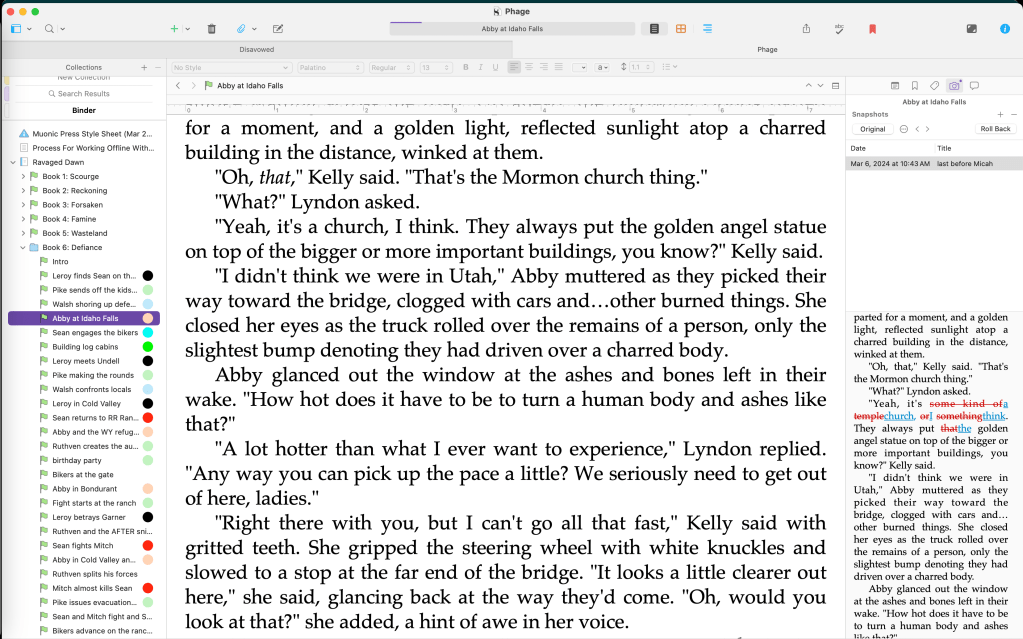
I like to think of it as a layer like in Photoshop, when I create my book covers (which we’ll talk about in a future blog post).
Now that the Word document is the final version, and my Scrivener file also contains the final version, everything gets saved and prepped for formatting.
From start to finish, I usually take about a week to run a week to two weeks to run through a 100,000 word book in the editing process, start to finish. Sometimes, when I’m on a tear and the writing is flowing, everything is seamless and the editing is a real joy. Other times, when the storyline is difficult or the characters aren’t behaving, it can be a real chore and the editing process only amplifies the difficulties I had in writing.

It happens—luckily not too frequently—but the end result is worth it. By running the story through multiple passes, from myself using my mark one eyeballs, through Pro Writing Aid, and finally putting it through the rinse cycle in Word, I’m able to put out the absolute best story I possibly can.
Is this better than a human editor, though?
It all depends on the editor. One thing that I really appreciate using the software tools is the consistency. The output you get from human editors will vary from person to person which is only natural. But the output from Pro Writing Aid, Word, and Scrivener is exactly the same. A consistently high quality of work that resonates with my readers. At the end of the day, that’s all I’m interested in.
Hopefully, if you’re still reading along, it means you’re interested in learning a little more. Next time we’ll talk about my formatting process! One of my favorite parts of publishing!
Until then, keep your heads down and your powder dry my friends, for we live in interesting times…
Notes
[1]: Broken Tide, Lost Sanctuary, and Ravaged Dawn.

 The Freeholder Press
Leave a reply to Writing Process: Marketing (part 1) – The Freeholder Press Cancel reply